Showing posts with label review. Show all posts

Thursday, January 19, 2012

Review: Patriot Viper Xtreme Division 4 16GB

Cometh the boards, cometh the memory kits. The release of Intel's quad-channel enabling X79 motherboards may have left the simulated ring of cash registers reverberating in the ears of every RAM manufacturer, but it's the ideal time to enable such a high-end feature because DDR3 is so darned affordable right now.

On top of that the sweet spot for quad-channel memory kits is healthy 16GB. Ker-ching. On paper, the Patriot kit appears to be excellent value.
It has opted for a more average 1,600MHz bus speed, helping reduce latencies to the 8-9-8 timings; something it attempts to call 'low latency'. Though we'd prefer to call it 'perfectly normal latency' at this speed.

This quad-channel kit looks suitably impressive, with chunky aluminium heat spreaders that stand 42mm high. These won't interfere with the standard Intel water cooler, but other coolers may struggle - it's worth checking.

A touch of OC

There's no doubting the heritage of the Division 4 memory – Division 4 is inherited from the dual-memory kits called Division 2. The hefty aluminium heat spreader certainly helps make you feel you're getting your money's worth, and does look the business when installed in dual-banks.

As we've noted, the CAS 8 latency can be considered low for DDR3, but it's what we're now expecting for 1,600MHz memory. To achieve this, the DIMMs are running at 1.65 volts rather than the lower 1.5 volts other DDR3 kits have proven capable of. While technically this is less power efficient, that's really not necessarily something that's at the forefront of X79 board owners' minds.

Installation went smoothly and without any issues. Running at 1,600MHz with the XMP profile provided flawless results. On a comparative performance level, the Patriot memory matches anything at the same speed.
As for overclocking, we had minor success, though as it's already running at 1.65 volts we weren't expecting too much. On raw frequency increase, it was happy to shift up to 1,700MHz with the same timings.

Increasing the memory to 1,866MHz was less of a success, with the CAS requiring a drop to 10, which effectively eliminates any gains in speed. What you gain in frequencies, you then lose to a poorer latency.

TechRadar Labs


Rendering performance
Cinebench R11.5: Index: Higher is better
Viper Extreme Division 4: 11.06
HyperX Genesis: 11.01


Memory bandwidth performance
Sisoft Sandra: Gigabit per second: Higher is better
Viper Extreme Division 4: 40
HyperX Genesis: 49


Gaming performance
World in Conflict: Frames per second: Higher is better
Viper Extreme Division 4: 112
HyperX Genesis: 114

The Patriot Viper Extreme Division 4 PC3-12800 memory kit may be a bit of a mouthful, but it's a great little kit. The biggest win is that it's very competitively priced, and yet its performance is good enough that you won't gain much by paying more, unless you specifically need the highest memory bandwidth possible.

It also helps that they look the part. While there's a little overclocking overhead, it's nothing that can be made use of in reality, and while the 1.65 voltage is not as desirable, these are both ultimately moot points. If you need a new RAM to go along with your new X79 board, then the Patriot kit does the job.


--------------------------------------------------------------------------------------------------
Liked this? Then share this page and subscribe to get the top stories of the week, plus the most popular reviews delivered straight to your inbox.

And don’t forget to give us your suggestions in the comments!


View the original article here

Thursday, January 12, 2012

CES 2012: Hands on: Aigopad m803 review


There aren't a massive number of headline-grabbing Android 4.0 Ice Cream Sandwich tablets here at CES 2012 (expect a load more at next month's Mobile World Congress) but this little Aigopad M803 caught our eye.
It has an 8-inch 1280 x 768 five point multitouch display and packs a 6,000 mAh battery. There's 8GB of storage on board as well as 0.3 megapixel front-facing camera, Wi-Fi, gyroscope and microphone.


As you'd expect, there's an ARM processor under the hood, and while we don't know exactly what it is, we do know that it's based on the Cortex A9 design.

It has to be quite a low spec variant because firstly Aigo wouldn't say what it was and secondly, the tablet was, well, rather slow. It was a shame actually, but Ice Cream Sandwich was just not very responsive to move between screens or apps.


The screen too, seems to be quite low spec and simply isn't as bright as we've come to expect - although perhaps we're spending a little too much time looking at OLEDs.


Many manufacturers do have pre-release kit on the show floor here at CES, so we will reserve final judgement until we get hold of a review unit.

As yet there's no word on the Aigopad M803 or pricing, but it will surely try and undercut bigger and better tablets on the market – it does need to be low, as this isn't a highly impressive implementation of Android 4.0.


------------------------------------------------------------------------------------------------------------
Liked this? Then share this page and subscribe to get the top stories of the week, plus the most popular reviews delivered straight to your inbox.

And don’t forget to give us your suggestions in the comments!


View the original article here

CES 2012: Hands on: LG Z330 and Z430 Super Ultrabook review


Not renowned for their PCs, Korean behemoth LG has released two Intel Ultrabooks here at CES 2012. And these aren't just Ultrabooks, the press release refers to them as Super Ultrabooks.
We're not quite sure why this is, but we'll go along with it. After all, we're in Las Vegas, where everything is supposed to be Super.
There are two models, the Z330 and the Z430 and as you can see the chassis of this model looks very nice indeed – what's more, they're among the slimmest and lightest Ultrabooks on show.


The 13-inch Z330 is the model shown here. LG has gone for the top of the pile with these models (and therefore they will be highly priced) and features the top-line Core i7 processor.


As with many other Ultrabooks, LG says it has managed to get the 13-inch display into a compact 12-inch chassis. Rather than being tapered at one end, the Z330 is 14.7mm thick across the whole chassis – gven that many Ultrabooks are 17-18mm thick, the Z330 really appeals. It's also among the lightest Ultrabooks around 1t 1.21kg.
We also really liked the keyboard on the model we saw, although the trackpad was a bit slippy for our liking.


As you can see, the 13-inch model pictured here has HDMI out and three USB ports - you only get two and mini HDMI with a lot of the tapered Ultrabooks. There's a drop down bit for the Ethernet port and one USB 3.0 port.


According to LG, the Z330 requires less than 10 seconds to complete booting and has a latest-class SATA3 SSD, too.


The 14-inch Z430 weighs 1.5kg is equipped with SSD and HDD, meaning storage capacities of up to 500GB. This is similar to the Series 5 from LG's great rival Samsung. But unlike that model, it's not clear if the Z430 can be bought with just SSD, or whether it comes with the two drives as a default.


-----------------------------------------------------------------------------------------------------------
Liked this? Then share this page and subscribe to get the top stories of the week, plus the most popular reviews delivered straight to your inbox.


View the original article here

CES 2012: Hands on: Samsung Series 5 Ultra review


We sure have seen some Ultrabooks this CES. Samsung has had two major computing launches at CES 2012. Firstly there was the new high-end Series 9 and then there's this – the new Samsung Notebook Series 5 Ultrabook.
Powered by an Intel Core i5 procesor, the Series 5 differentiates itself from many of the other Ultrabooks on offer at the show by packing beefed-up graphics in the form of an AMD Radeon HD chip inside the bigger 14-inch model. It also has something called an 'optical disc drive' – we're pretty scared that disc storage seems like such an outdated concept.


The Series 5 is available in a 13-inch too – it's interesting that the sizes aren't more different - but both size variants have the Intel Core i5-2467M processor and up to 8GB of memory.


The 300nit HD LED SuperBright screen is lovely and bright and is anti-glare, though this didn't seem to help on the show floor at CES.


So let's talk about the 13-inch. It's between 14 to 17.6mm thick and weighs a measly 1.38kg – a fairly standard Ultrabook weight.


As is generally the case with Samsung laptops, the keyboard seems great, while the trackpad buttons are definite and well designed.


As well a 128GB SSD or 258GB SSD, there is also an option to go for higher capacity by using a standard hard drive – up to 500GB.
Samsung says the 14-inch can be configured with up to 1TB of storage – an incredible amount.
However, this creates a problem – SSD storage is fast. So the Series 5 includes a tech to boost the speed of the standard drive - ExpressCache by Diskeeper. This uses a small 16GB iSSD to speed up the system. Samsung cites a 20 second boot time and 2 second resume from standby, which is only a little slower than many other Ultrabooks featuring SSDs.
The only area the Series 5 13 disappoints is in battery life – Samsung cites 6.4 hours. This pales in comparison to the 8-9 hours promised by many other Ultrabooks.
The 13" model also has a full-size HDMI port along with one USB 3.0, two USB 2.0, a 4-in-1 multi SD card slot, an Ethernet connection and webcam.
The 14" model offers full-size HDMI, VGA, two USB 3.0, one USB 2.0, a 4-in-1 multi SD card slot, Ethernet and built-in webcam. It's 20.9mm thick and weighs 1.84kg


-----------------------------------------------------------------------------------------------------------
Liked this? Then share this page and subscribe to get the top stories of the week, plus the most popular reviews delivered straight to your inbox.


View the original article here

CES 2012: Hands on: Motorola Defy Mini review


Motorola announced the Motorola Defy Mini here at CES, and we got a chance to test out the rugged entry-level phone that's sparse on features and small in stature.
The most noticeable feature of the Defy Mini is, well, how Mini it is.It comes with a tiny 3.2-inch HVGA touchscreen.
Though the Defy Mini is being advertised as a beginners entry into smartphones, it seems to us that trying to type on the screen will be more of an exercise in futility than a learning experience.


The apps switch between horizontal and vertical, depending on how you hold the device. Because it's so small, we suspect many people will hold the phone primarily in landscape, to access a larger keyboard.
There are a few other features equally geared toward a budget phone - a 3MP rear-facing camera with LED flash and a front-facing VGA.


At the very least, mothers and fathers of dirty little children will be happy to find that its both dust-proof and water resistant.
The phone comes with a surprisingly adequate 1650mAh battery, which should keep the phone alive for about 10 hours of talk time. Not bad, we say.


The phone was small enough to feel unique and comfortable in the hand. The size also contributes to the phone feeling as if its truly geared toward a younger audience - perhaps children who desperately want to get their first Android phone.
That's not to say that it won't find a place in the heart who just wants their smartphones to be small and stay out of their way.


The Motorola Defy Mini is set to hit store shelves in Europe, China, and Latin America this February.
Still no word on pricing, but with a feature set like the aforementioned, we wouldn't guess it'll be much.


-----------------------------------------------------------------------------------------------------------
Liked this? Then share this page and subscribe to get the top stories of the week, plus the most popular reviews delivered straight to your inbox.


View the original article here

CES 2012: Hands on: Motorola Droid 4 review


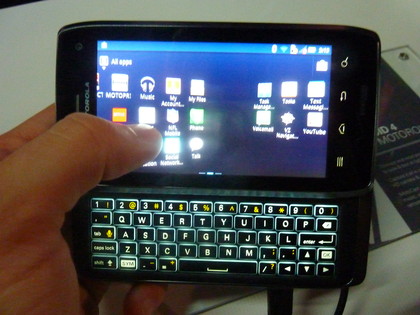
Motorola recently announced the Droid 4, a 4G LTE-compatible QWERTY phone that will hit retailers in coming weeks.
The first thing anyone will notice about the phone is how sleek and Razr-esque it feels in your hand.
It's a QWERTY phone with a slide-out keyboard, but upon first handle it felt a bit like a slightly chunky touch phone.


That's because at .5-inches it's surprisingly thin - thin enough for Motorola to bill it as the world's thinnest LTE QWERTY phone.
But all that wouldn't much matter if the keyboard was garbage, and we're happy to report that we were able to quickly type on it, without having to relearning much of anything.


The keyboard is edge lit so you type in the dark with rounded keys that help you find the tiny buttons you're looking to type.
The Droid 4 is currently running Android 2.3.5, but should get a bump to Android 4.0 in the first half of the year.


It's slightly more powerful than its predecessor as well. It has a 1.2 GHz dual-core processor and 1GB of RAM, and we tested a variety of intensive apps and each were smooth and fast.
The Droid 4 also has an 8MP rear-facing camera capable of 1080p HD video capture. Our test pictures looked mediocre at best, but we'll wait to pass final judgment for when we have a bit more ideal lighting circumstances (Motorola's booth was exceptionally dark).


Other than that, many of the specs should look familiar. There's the same sized scratch resistant 4-inch display, 16GB internal memory (which can be expanded with up to a 32GB microSD), and LTE Hotspot capabilities.


So how much will this slider cost you? No firm price has been released, but rumors suggest the phone will release for $249 with a two-year contract.
But wait, there's more
Motorola also announced the Droid Razr Maxx, which adds a slight bulk to its wonderfully thin Droid Razr but adds a gargantuan 3300 mAh battery.
We'll let you know when official details surface for either of these phones.


-----------------------------------------------------------------------------------------------------------
Liked this? Then share this page and subscribe to get the top stories of the week, plus the most popular reviews delivered straight to your inbox.


View the original article here

CES 2012: Hands on: OnLive Desktop review


Not content with taking on the gaming giants with its great streaming service, OnLive surprised all this week by announcing that it was getting into cloud computing in a big way, with the launch of OnLive Desktop for the iPad.
This service allows iPad users to use the Microsoft Office Suite on their tablets with full touch capabilities and the added bonus of being able to show off processor-intensive presentations without worrying that the iPad can't handle the pressure. This is because the whole thing is streamed in real-time from OnLive's bounty of servers so the tablet you are using is a conduit to the service.
TechRadar was given an in-depth look at OnLive Desktop at CES 2012 and it's quite frankly incredible.


While many will think that it is an odd thing for OnLive to launch, it does make sense that the company has gotten into the cloud computing sector.
In fact it is a logical leap; the servers and the technology are already there from its gaming sector so you don't have to worry about things like latency and service dropouts.


Considering OnLive has so far had no downtime whatsoever, there's no question that you can trust the company to deliver Microsoft Office without fear that your documents will be stuck in the internet ether.
OnLive Desktop works by downloading the app, signing up to the service – you can use your current OnLive log-in – and then accessing Office from the OnLive portal.


The apps are all completely touch enabled as you are essentially accessing the native Microsoft Windows 7 software from OnLive's cloud service.
When we scrolled through both Word and PowerPoint we noticed minimal lag and you could pinch and zoom into the docs with ease.
If you have a stylus handy then you can write onto the doc and the handwriting recognition tech will turn your scrawl into text.


There's also afull on-screen Windows keyboard and we played back the likes of video, animation and slide transitions was effortless.
OnLive has nailed cloud computing with OnLive Desktop. Its servers ooze power and speed and this is noticeable when using the service. Well, actually it's not as you easily forget that the document you are creating is in the cloud and not on the iPad itself.


When the service is released on iOS this week, Onlive Desktop will be free. With this you get 2GB of storage and access to Microsoft Office.
A premium version is in the works called Onlive Desktop Pro and this will offer 50GB of storage and the brilliant addition of superfast web browsing. Through the Pro version, you will be able to browse the web using all the power of OnLive's servers.


Not only does this offer full Flash web browsing (we know, on an iPad!) but you can take advantage of OnLive's speedy web connection. We were shown a speed test and it maxed out at 375Mbps, but OnLive reckons it can be far speedier.


The brilliant thing about this new service is that it sounds like it is just the start of many programmes getting a cloud makeover.
OnLive let us into a secret that it began life as a white label solution for Autodesk, where it ported the processor-intensive Maya 3D-rendering software into the cloud.


If it can do that with ease, then hosting a Word document won't exactly see its servers breaking a sweat.
If you aren't an iPad user, then an Android version of the service is coming soon.


-----------------------------------------------------------------------------------------------------------
Liked this? Then share this page and subscribe to get the top stories of the week, plus the most popular reviews delivered straight to your inbox.


View the original article here

Wednesday, January 11, 2012

BlackBerry Curve 9380 review: Not what you'd expect


The BlackBerry Curve 9380 is RIM?s first ever-released Curve with a touchscreen. The Curve lineup is usually an expression of RIM?s understanding for a budget phone and this one supposedly, doesn?t make a difference. It should attract customers with a lower entry price while offering the full BB OS 7 experience.


BlackBerry Curve 9380
The new Curve 9380 is basically a downgraded Torch 9860 ? it has a less-capable processor and smaller and low-res display. Both gadgets look similar too, but the Curve's pricetags makes up for the differences.

So, let's take a look at the Curve 9380 full feature list, followed by potential deal-breakers as we saw them.

Key features:

- 3.2" 16M-color TFT touchscreen of HVGA resolution (360 x 480 pixels)
- Quad-band GSM support and tri-band 3G with HSDPA
- Single-core 800MHz processor
- 512MB RAM
- BlackBerry OS v7
- BlackBerry's proprietary email service and data security
- Wi-Fi b/g/n connectivity
- GPS receiver and BlackBerry maps preloaded
- 5 megapixel fixed-focus camera and a LED flash
- VGA video recording @ 30 fps
- 150MB of inbuilt storage
- 2GB MicroSD card pre-bundled
- Four physical buttons at the bottom
- Optical trackpad
- Hot-swappable microSD card slot (up to 16GB)
- DivX and Xvid video support
- Office document editor
- 3.5 mm audio jack
- Smart dialing
- Ultra-fast boot times
- Solid build quality

Main disadvantages:


- BlackBerry Internet Service account is a must to enjoy all the phone features
- No physical QWERTY keyboard (a potential deal breaker for a BlackBerry)
- No videocalling and no front facing camera either
- No Flash support for the web browser
- No FM radio
- Screen has no haptic feedback
- Poor audio quality and loudspeaker performance

As you can see, most of the listed drawbacks of the new Curve are typical BlackBerry. So if tyou are even thinking about getting any of RIM?s phones, you?ve probably already accepted to live with those ? the mandatory BIS plan for emails and data traffic as well as the poor variety of apps and the high App World prices.


BlackBerry Curve 9380 live pictures
So, the Curve 9380 offers the latest BlackBerry experience on a cheaper price and without losing much of its appeal. The BlackBerry OS 7 on this Curve is as capable and fast as on the Torch 9860, the main difference being the lack of HD video recording.
Our traditional hardware tour starts right after the jump.

View the original article here